Three changes to the screen where a partner decides on a new booking: a new audio address player, one entry point for help with the address (in place of two), and tighter spacing so the card fits the new structure.
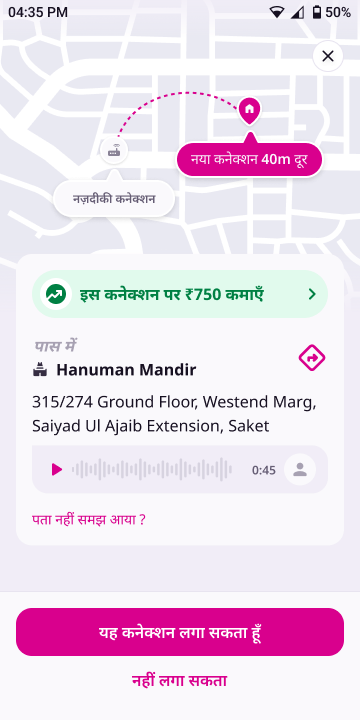
A chat-bubble player: play/pause, a full-width waveform, the duration and a customer avatar. The पता समझें label goes.
02 · Entry point
One link, two options
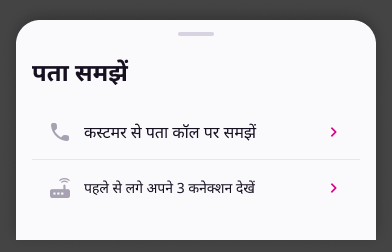
The पता नहीं समझे? link and the nearby-connections row become one link. It opens a sheet: call the customer, or see your nearby connections.
03 · Spacing
Tighter card
Gaps inside the address card get smaller, and the nearby row leaves the card. The new values are marked in Figma and listed below.
CurrentLive on masterNewNew design
Where this applies. The card is one composable, BookingFpnOverlay. It is rendered in two places, and both get the change: the booking FPN (MainActivity) and the booking drilldown (BookingFlowContent). The call sheet and the nearby-connections sheet stay as they are. Only the way you reach them changes.
Change 01
Audio address player
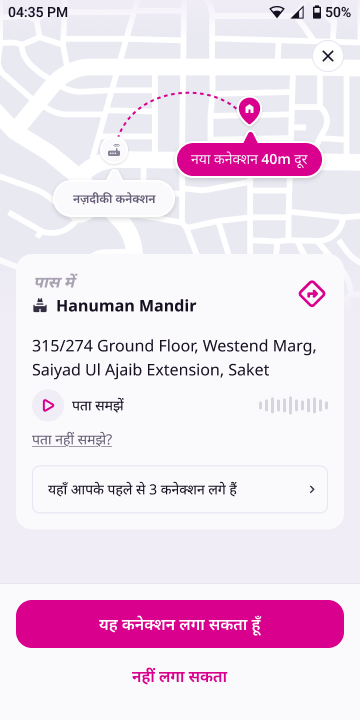
The player now looks like a voice note from the customer. Before, it was a small play button, the पता समझें label and a 12-bar waveform pushed to the right. Now it is one tinted bubble that runs the full width of the card.
PlayingAudio bubble
Anatomy
Part
Spec
Before
Container
Full card width × 48dp tall · bg bg/subtle #F1EDF7 · padding 12 H / 8 V · radius 16 on top-right, bottom-right and bottom-left, 0 on top-left (bubble tail) · gap 8 between the parts
36dp row, no container
Play / pause
24dp icon in brand #D9008D, with no circle behind it. Shows play when idle and pause while playing
36dp grey circle with a 14dp icon
Label
Removed
पता समझें
Waveform
Fills all the width left over, 4dp after the icon · 32dp tall · bars 2.5dp wide, 2dp apart, radius 2, heights 5 to 24dp · idle bars bg/disabled #D7D3E0 · while playing, bars up to the playhead turn bg/brand #D9008D
32dp circle, bg bg/default #FAF9FC, 20dp user_name icon. Shows that this is the customer's voice. Display only
Did not exist
States
Idle: play icon, all bars grey, total duration.
Playing: pause icon, bars fill pink left to right with progress.
Paused: play icon, the pink fill stays where it stopped.
Finished: rewinds to Idle. This matches today's behaviour.
No recording: the bubble is not shown at all, as today. The link sits 16dp under the address.
Loading / failed to load: not designed yet.
Tracking does not change: address_audio_played still fires on play.
Change 02
One entry point: पता नहीं समझ आया ?
The card used to offer two separate ways to work out an address. The पता नहीं समझे? link opened the call sheet. A bordered row, यहाँ आपके पहले से 3 कनेक्शन लगे हैं, opened the nearby-connections sheet. Both solve the same problem, so they now sit behind one link. The nearby row is removed from the card.
पता नहीं समझ आया ?→Sheet · पता समझें→Call sheet or Nearby sheet
The link
Copy पता नहीं समझ आया ? (was पता नहीं समझे ?).
Label/L2_14_Regular 14/20 · brand #D9008D · no underline · left-aligned. Before, it was bodyMd in textSecondary with an underline.
Sits 16dp below the address block and is the last item in the card.
New sheet: पता समझें
NewAddress help sheet
Sheet: bg bg/default · top radius 24 · drag handle 36×4 stroke/subtle (handle row 12 top, 8 bottom) · content 12 top, 24 bottom, 16 sides. There is no CTA. It closes on drag, scrim tap or system back.
Title:पता समझें · type/heading/lg 24/32 Bold · 16dp to the list.
Rows: DS List Item, Type=Default · min-height 48 · padding 16 · gap 12 · 24dp leading icon · 20dp chevron on the right in brand · 1dp divider between rows.
Row 1 · call
कस्टमर से पता कॉल पर समझें
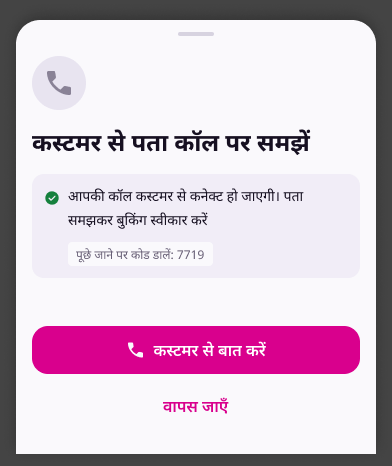
Opens the existing call sheet, AddressUnclearSheet, with the IVR call and the code chip. Same behaviour as today's link.
Row 2 · nearby
पहले से लगे अपने {count} कनेक्शन देखें
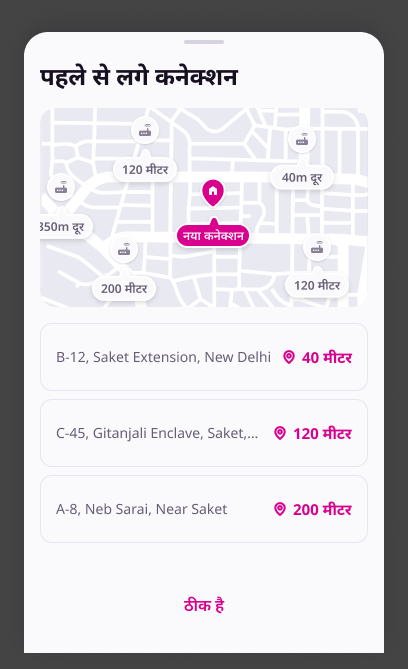
Opens the existingNearbyConnectionsSheet (map + list). Same behaviour as today's nearby row. {count} is the existing nearbyConnectionsCount.
When a row can't be shown
Today the nearby sheet opens only when there are connections and the booking has map coordinates. Under the same conditions, Row 2 is hidden when the count is 0 or the booking has no lat/lng.
Row 1 is always available. If the booking has no IVR code, the call sheet hides the code chip, as it does today.
The two sheets it opens
ExistingCall sheetExistingNearby sheet
The layouts don't change. One copy difference: the Figma call-sheet CTA reads कस्टमर से बात करें, while the live string is कस्टमर से बात करवाएँ. See the copy table.
Change 03
Spacing
The card padding is unchanged at 16dp. The gaps inside the card are smaller. Values are from the Figma auto-layout. Token names are the WiomSpacing equivalents.
Gap
Current
New
₹750 banner → पास में
16 · lg
16 · lg (same)
पास में → landmark name
4 · xs
0
Landmark row → address
16 · lg
8 · sm
Address → audio bubble
12 · md
8 · sm
Audio bubble (or address, if there is no audio) → link
8 · sm
16 · lg
Link → nearby row
16 · lg
Row removed
Landmark block → directions icon (horizontal)
space-between
12 · md, icon vertically centred on the 2-line block
Bottom CTA bar padding
16 all sides
16 top · 24 bottom · 16 sides
Bottom CTA bar top edge
none
1dp stroke/default #E8E4F0
नहीं लगा सकता (tertiary) vertical padding
8 · sm (40dp tall)
4 · xs (32dp tall)
Primary → tertiary CTA
8 · sm
8 · sm (same)
Figma shows the address and its locality as one paragraph. Render them with no extra gap between the lines. Today there is a 4dp gap.
Strings
Copy
Keys live in booking_labels_hi_en.json. The key names for the new sheet are suggestions.